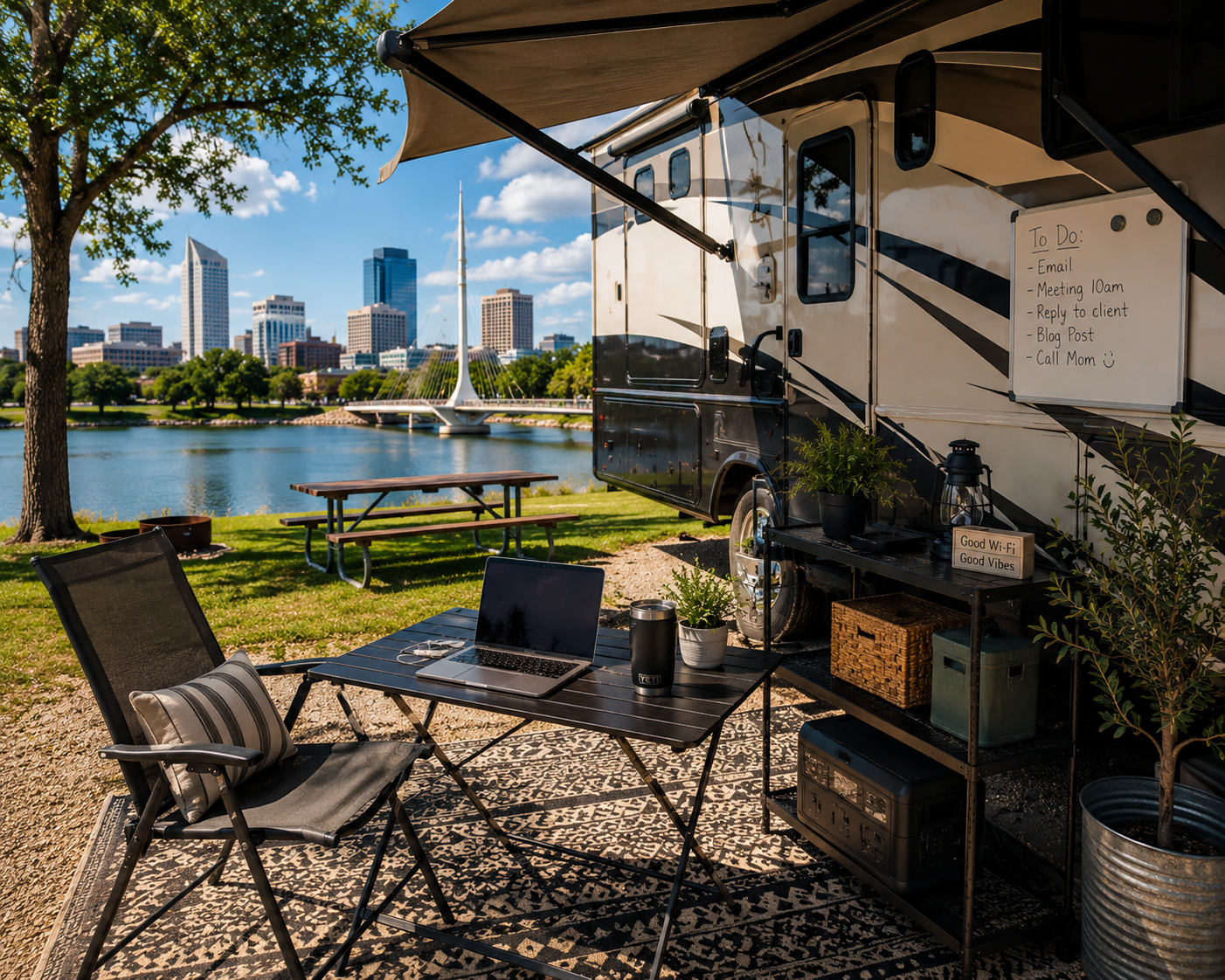
Working remotely from an RV is one of the better arrangements modern life has made possible. Getting the outdoor workspace right makes it genuinely great.
That’s the dream version, anyway. The reality requires a bit more setup than just pulling up a camp chair and opening your computer. Sun glare, wind, connectivity, ergonomics, bugs — all of these are solvable problems, but they don’t solve themselves. Getting your outdoor workstation dialed in properly is what separates the dream version from the one where you’re squinting at a washed-out screen and wondering why your back hurts.
This guide walks through the practical setup, the gear that actually helps, and the specific considerations for working outdoors during an RV stay in Wichita. Whether you’re a full-time digital nomad or someone doing a week of remote work between destinations, there’s something here that’ll make the setup better.
Why Wichita Works for Remote RV Workers
Before getting into gear and setup specifics, it’s worth acknowledging that location matters for remote work RV setup success — and Wichita is actually a pretty solid choice for workers who need reliable connectivity, access to urban resources, and enough infrastructure to handle a longer working stay.
Wichita is a mid-sized city — around 400,000 people — with the connectivity you’d expect from an urban area: multiple cell carriers with good coverage, a fiber internet infrastructure that extends to many RV parks in the metro area, and plenty of coffee shops, libraries, and co-working spaces available as backup when the outdoor setup isn’t cooperating with the weather.
The climate is four-season but has genuinely excellent working-outdoors windows. Spring — April and May — brings mild temperatures and low humidity before the summer heat arrives. Fall — September through early November — is arguably the best outdoor working season in Kansas: cool mornings, warm afternoons, clear skies, and the kind of light that makes being outside feel like a reward rather than a compromise.
Summer middays are the exception. Kansas summer heat is real, and working outside from noon to 3 p.m. in July requires shade, airflow, and realistic expectations. But even summer has its outdoor windows — early morning and evening work sessions outside are genuinely pleasant while the middle of the day is better handled inside with the AC running.
“The best outdoor workspace isn’t the one with the most gear. It’s the one where you actually want to sit down and do the work.”
The Foundation: Your Awning Setup
If you’re working outdoors from an RV, the awning is your office structure. Everything else — chair, table, power, connectivity — is furniture inside that structure. Getting the awning configuration right is the first priority.
Extend and Stabilize
A fully extended awning gives you the most shade coverage, but in Kansas wind — which is not a hypothetical — an unsupported awning is a liability. Awning support poles at the extended corners are standard equipment, but add awning anchors or de-flappers that stake into the ground and keep the fabric stable in a breeze. Wind that moves your awning constantly is distracting and potentially damaging to the hardware. A few minutes of anchoring setup saves a lot of frustration during a four-hour work session.
Awning Screen Walls
For longer stays where the outdoor workspace gets daily use, adding a side screen panel to the awning transforms it from a shade structure into a proper room. Screen walls block direct sun on the exposed sides, significantly reduce bug intrusion, and create a visual enclosure that actually helps with focus — the same reason people concentrate better with walls around them than in completely open spaces. Several aftermarket awning screen systems attach with clips or velcro and are fully packable when you move. Worth the investment for anyone doing extended remote work stays.
Ground Covering
A proper mat under the awning finishes the outdoor office feel and keeps dirt from tracking into the RV every time you go inside to grab something. Interlocking foam tiles, reversible outdoor rugs, or purpose-made RV patio mats all work. The mat also defines the workspace visually — there’s something about a deliniated area that helps with the mental transition into work mode.
The Desk and Chair: Don’t Cheap Out Here
This is where the RV patio office ideas conversation usually gets vague. “Get a folding table” is technically correct but not very useful. The quality difference between a wobbly plastic card table and a proper height-adjustable folding camp desk is significant, and you’ll notice it immediately in how long you can comfortably work.
The Table
Look for a folding table with adjustable legs — the ability to set the work surface at proper desk height (roughly 28 to 30 inches for seated work) matters more than any other single feature. Tables designed for camping that max out at 24 inches are fine for meals but force a hunched posture for laptop work that becomes painful quickly. Aluminum construction is lighter than steel. A surface area of at least 24 by 36 inches gives you room for a laptop, a notebook, and a drink without everything feeling cramped.
The Chair
Standard camp chairs — the low-slung, zero-gravity style — aren’t designed for work posture. Your hips are below your knees, your lower back loses support, and after an hour you’re shifting constantly trying to find a comfortable position. For work sessions longer than 30 minutes, you want a chair with a higher seat, a proper back support angle (roughly 90 to 100 degrees), and armrests that let your shoulders relax. Folding director’s chairs, certain camp stool designs with back support, and purpose-made portable office chairs all work better than the standard camp chair for work use. Try the chair before a long day of work, not during it.
Power and Connectivity: The Technical Foundation
The most beautiful outdoor workspace setup is useless if the laptop dies at 11 a.m. and the WiFi drops every 20 minutes. Digital nomad campground tips around power and connectivity are some of the most practically important in the whole setup conversation.
Power Management
Most RV parks offer 30 or 50 amp electrical hookups, but running an extension cord from your pedestal to your outdoor workspace is both a tripping hazard and a potential violation of some park rules. A better solution is a portable power station — lithium battery units from brands like Jackery, EcoFlow, or Goal Zero — that you charge overnight from shore power and then use to run your laptop, monitor, and phone charger through the workday without any cord running across your site. A midsize unit (500 to 1000 watt-hours) is more than enough for a full day of laptop work with a phone on charge.
If your rig has solar panels, even better. A solar system that can sustain a working day’s laptop load is genuinely freeing — you’re not managing battery levels, just working.
Connectivity Options
Park WiFi is notoriously unreliable for serious work — bandwidth is shared across every rig in the park, and video calls are the first thing to suffer. For outdoor productivity while traveling, a dedicated cellular hotspot on a good data plan is the most reliable baseline. The major carriers — Verizon, AT&T, T-Mobile — all have strong coverage in the Wichita metro area. A signal booster mounted to the exterior of your RV can meaningfully improve cellular reception in spots where you’re on the edge of a good signal.
Starlink has become an increasingly practical option for full-time RV workers. The portable version can be set up outside and provides satellite internet that’s genuinely fast enough for video calls. The monthly cost is higher than a cellular plan, but for full-time workers, the reliability premium is often worth it.
Dealing with Sun Glare
Laptop screens and direct sunlight are incompatible. This is probably the single biggest practical frustration for people who try outdoor computer work without solving for it first.
Position your workspace so the sun is behind you, not in front of or to the side of your screen. Morning sessions work well with an east-facing setup; afternoon sessions want a west-facing position. A laptop privacy screen — the type designed to prevent visual hacking in public spaces — doubles as a significant glare reducer outdoors. An anti-glare screen protector adds another layer.
A secondary monitor is harder to manage outdoors specifically because of glare, but if you genuinely need one, a portable monitor with a matte (non-glossy) screen surface is significantly more usable outside than a glossy panel. Position it in full shade and angle it away from any direct sky reflection.
The Hat and Eyewear Factor
Working outside in a wide-brimmed hat sounds faintly ridiculous until you’ve tried it on a sunny Kansas morning. It keeps sun off your face and reduces the ambient glare that makes your eyes work harder than they should. Polarized sunglasses designed for computer work (with lenses optimized for screen viewing rather than distance) exist and are worth looking at for heavy outdoor work users. Regular polarized sunglasses often create a visual problem with LCD screens — blue-light filtering lenses are the better choice for screen work.
Managing Wind: Kansas-Specific Advice
Kansas is windy. This is not a secret to anyone from Kansas, but it surprises travelers from calmer climates. Wind is the outdoor workspace problem that doesn’t get enough attention in general remote work advice, because most of it is written by people in places where wind isn’t a daily factor.
Windbreak options include the awning screen walls mentioned earlier, natural site features like trees or other RVs that block the prevailing westerly wind, and physical windbreaks like folding privacy screens that you can position around the workspace. Keep a small weighted paperweight or document clip situation going for anything on paper. Keep your coffee cup in a proper spill-resistant tumbler rather than an open mug. Accept that some days in April and May will move the outdoor workspace inside — and that’s fine.
Making It Work for Your Specific Stay
The setup looks different depending on how long you’re in Wichita and what kind of work you’re doing. For a short-term stay in Wichita, a simpler setup — portable power station, good chair, basic awning anchoring — is probably enough. You’re not optimizing for maximum efficiency; you’re just maintaining work continuity while you explore.
For a longer stay where the outdoor workspace is your primary office for weeks or months, the investment in screen walls, a proper work chair, and a reliable connectivity setup pays for itself quickly in comfort and productivity. The park amenities at Wichita RV Park — including electrical hookups that support consistent power for charging — give you the infrastructure foundation that the outdoor setup layers on top of.
For travelers who want to understand what the broader Wichita area offers on days when work wraps up early, the Wichita exploration guide covers the city’s food, culture, and outdoor options in useful detail. And if your remote work situation gives you flexibility to work from different spots, the area around Halstead — detailed in the Halstead guide — has a quieter, small-town character that works well for focused work sessions away from the city.
Travelers pushing further south in the region should know that the RV park near Arkansas City provides another well-positioned base if work or exploration pulls you toward the Oklahoma border. And Wichita RV Park itself remains one of the more practical home bases in the region for remote workers who need urban amenities without giving up the campsite lifestyle.
Frequently Asked Questions
What is the best time of year to work outdoors from an RV in Wichita?
Fall — September through early November — offers the best overall conditions for outdoor RV work in Wichita. Temperatures are comfortable, humidity is low, and the light quality is excellent. Spring (April through May) is the second-best window, though spring thunderstorm season requires weather awareness. Summer mornings before 10 a.m. and evenings after 5 p.m. are workable; midday summer heat is better handled inside. Winter is possible on mild days but too inconsistent for reliable outdoor work planning.
What internet connectivity options work best for remote work at Wichita RV parks?
A dedicated cellular hotspot on a Verizon, AT&T, or T-Mobile unlimited data plan is the most reliable baseline — all three carriers have strong coverage in the Wichita metro area. Park WiFi should be treated as a supplement, not a primary work connection, due to shared bandwidth limitations. For full-time remote workers doing regular video calls, Starlink’s portable option provides satellite internet fast enough for professional use. A cellular signal booster can improve hotspot performance in areas of marginal coverage.
How do I handle sun glare on my laptop screen when working outdoors?
Position your workspace so the sun comes from behind you, not in front of or beside your screen. A laptop privacy screen doubles as an effective anti-glare filter. An anti-glare screen protector adds another layer. Working under an awning or in full shade eliminates most glare issues — direct sunlight on a screen is rarely workable regardless of screen brightness settings. Morning and evening sessions, when the sun angle is lower, are generally more manageable than midday work sessions.
What chair works best for extended outdoor work sessions in an RV?
Standard low camp chairs are not suited for extended computer work — the seating position compromises posture and causes back discomfort within an hour. Look for a folding chair with a seat height of 17 to 19 inches, a backrest angle near 90 to 100 degrees, and armrests at a height that lets your shoulders relax. Folding director’s chairs, camp stools with proper lumbar support, and portable office-style folding chairs are all better options than conventional zero-gravity camp chairs for work use. Test any chair with actual work before committing to a full day in it.
How do I power my outdoor workspace without running extension cords from the RV pedestal?
A portable power station — lithium battery units in the 500 to 1000 watt-hour range — charged overnight from your shore power hookup is the cleanest solution. Units from Jackery, EcoFlow, or Goal Zero are reliable, charge quickly, and run a laptop plus phone charger through a full workday easily. This eliminates the cord hazard, avoids park rules about cord placement, and gives you a self-contained power system that goes wherever you set up. RVs with rooftop solar panels can go further and sustain the power station through the workday without drawing on shore power at all.
Is Kansas wind a serious problem for outdoor RV workspaces?
Yes — Kansas wind is a genuine and consistent factor, not an occasional nuisance. The prevailing westerly winds in the Wichita area are strongest in spring and can make unsecured awnings, loose papers, and open laptops a real problem. Practical mitigations include awning de-flappers and ground anchors, side screen panels to create a windbreak around the workspace, site selection that uses the RV body or nearby trees as a wind buffer, and keeping everything in closed containers or weighted down when not actively in use. On high-wind days — above 25 to 30 mph — moving the workspace inside is the pragmatic choice.